
Appearance
🚀 Changelog
8.3.1
✨ New Features
Private List Views
When multiple people collaborate in the same list, everyone often needs a different way to view the work. You can now make a list view private and share it only with selected users. This allows each collaborator to create their own personalized views—with custom filters, sorting, and grouping—so they can focus on what matters to them without changing how the list looks for others.
How to make it private: Click on any List View → Settings → Make Private, then choose which users in your space can access the view.
Task Card Updates
- Task cards now display their assigned category directly on the card, making it easy to quickly identify a task’s type and update its category at a glance—without opening the task form.
Update Category in Bulk Actions
- You can now apply categories to multiple tasks at once using bulk actions, making it faster and easier to organize tasks at scale.
UI Updates & Improvements
- Common UI updates and improvements to make GoTodo smoother, more intuitive, and better to use every day.
8.2.9
✨ Select All
You can now quickly manage multiple tasks with improved bulk selection.
- Select all tasks in a list or within a specific group across Checklist, Board, Timeline, and Table views.
- With this update, you can quickly perform bulk actions — for example, moving all tasks in one status to another, or shifting every task in a list in just a single step.
📌 Sidebar Improvements
We’ve refreshed and reorganized the sidebar for better usability:
- Summary has been moved to the mini sidebar for quicker access
- Workflow Usage is now included directly in the sidebar
- Improved visual design for a cleaner, more intuitive navigation experience
8.2.7
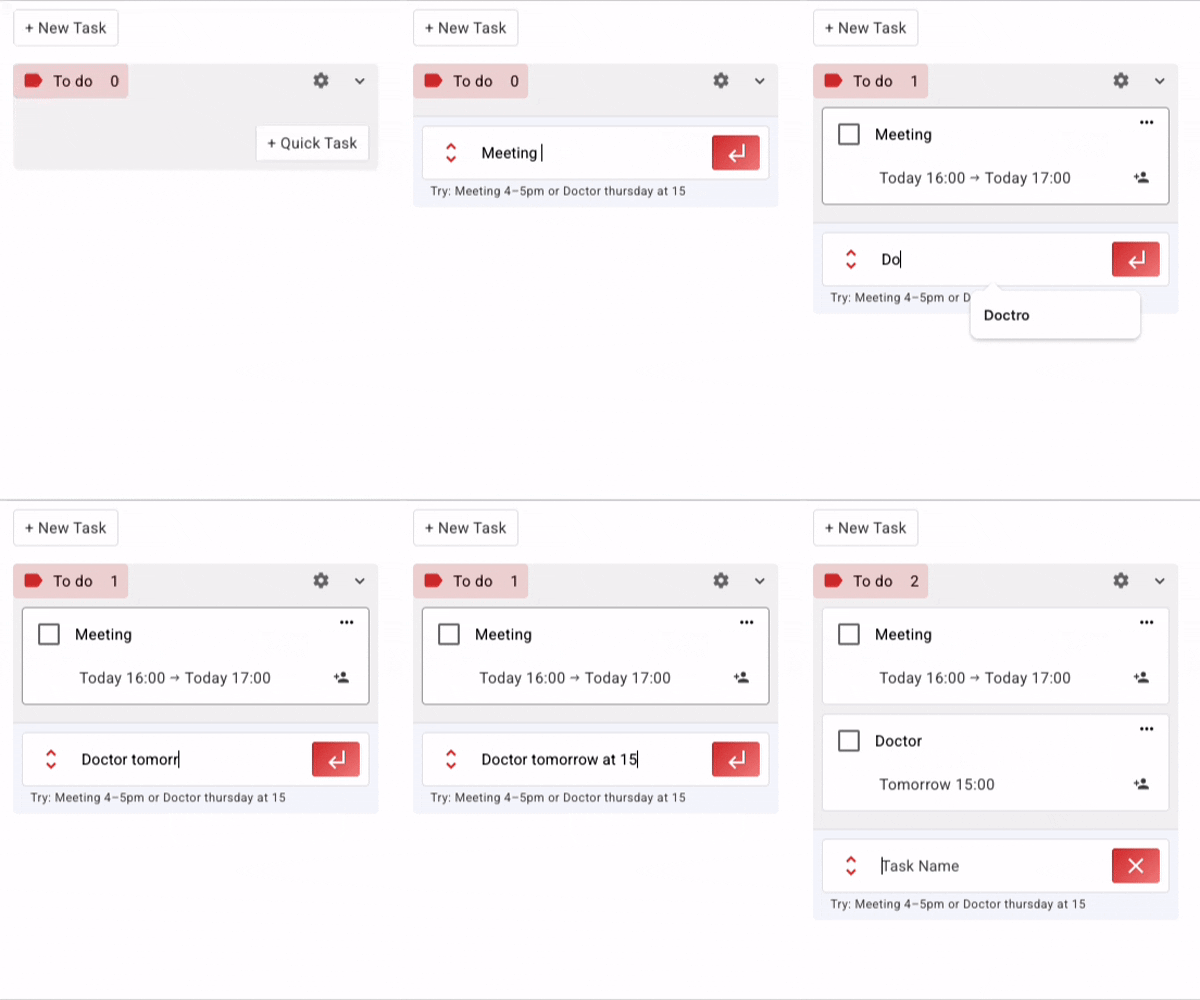
✨ Quick Tasks Just Got Quicker!
You can now create tasks faster than ever using natural language input. Just type what you want, like “Meeting 4–5pm” or “Doctor Thursday at 15.” (English only.)
No more need to create a task first and then schedule it.
8.2.6
✨ Improvements
The shortcut user filter in the List view has been enhanced. Previously, it displayed only tasks assigned to the selected users. It will now show tasks where the selected users are either assigned to the task or are the owners. This provides a more complete and accurate view of user-related tasks.
8.2.4
🗓️ Calendar Enhancements
Show Done Filter
We’ve added a new “Show Done” filter in both My Calendar and Team Calendar.
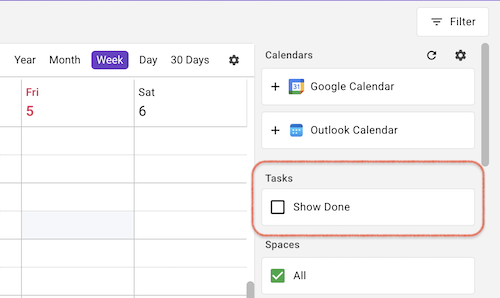
- Completed tasks are hidden by default for a cleaner view.
- Use the new filter to display completed tasks whenever needed.
👤 Change Task Owner
You can now update the owner of a task—either individually or in bulk.
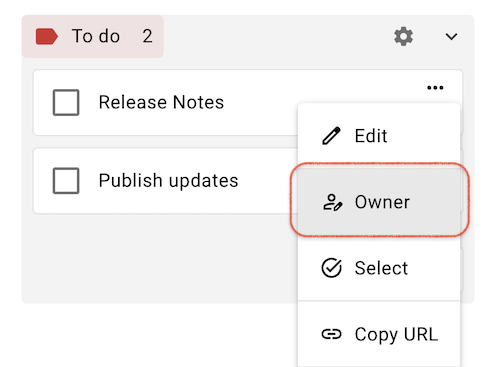
This works hand-in-hand with the “Mine Only” filter, which shows you only the tasks you own or are assigned to.
When creating tasks for someone else, simply change the task owner so that your “Mine Only” view stays focused on your own tasks, while the intended owner sees the task in their filtered view. Thanks for the feedback!
8.2.1
Automation Workflow v1 — Pro Feature
- Introduces end-to-end workflow automation.
- Seamlessly connect your apps and automate repetitive tasks by triggering actions via webhooks, HTTP requests, forms, and other tools.
- Enables two-way task sync—changes made in GoTodo, such as closing or reopening a task, are automatically updated in LeadConnector and GoHighlevel Tasks.
- More app integrations coming soon, including Google Forms, Google Sheets, and others.
- Pricing is per workflow run (not per step).
Fixes & Improvements
- Bug fixes and performance enhancements for a better experience.
Thank you for using GoTodo! We’re always working to make your productivity better.
8.1.0
✨ Mine Only Filter
- In one click, filter your lists to show only tasks you created or tasks assigned to you.

Thanks for using GoTodo, and don’t forget to grab the lifetime offer!
8.0.2
⚡ Improvements
Small UI tweaks to make your task management even more enjoyable.
Bug fixes and performance enhancements for a better experience.
Thank you for using GoTodo! We’re always working to make your productivity better.
8.0.0
Updates
- Backend enhancements to prepare for exciting new calendar features coming soon to the mobile app.
7.9.9
Updates
Polished UI/UX for a smoother, easier experience 🎨
Performance tweaks for extra speed ⚡
7.9.8
✨ New Sidebar & Improved Navigation
We’ve redesigned the sidebar to make navigation smoother and give you more room to focus on your work:
- Mini Sidebar: Essential features like Search, Favorites, Calendars, Dashboard, Goals, Timesheets, Reminders, Invite Users, and Settings are now housed in a compact mini sidebar.
- More Space for Collections: This new layout provides extra room for your Collections, helping you organize and access them much more efficiently.
- Future-Ready: The new structure is prepared to host upcoming features like 💬 Chats and 🤖 Automations, ensuring your workflow remains smooth and organized as we grow.
📊 Dashboard Table & Pie Widgets Enhanced
Thank you for your feedback, we've enhanced the Table and Pie widgets:
- Enhanced Grouping: Table and Pie Widgets can now be grouped by List, in addition to the existing Status and Priority options.
- Better Insights: This update makes it significantly easier to analyze and visualize your tasks across projects.
Enjoy a cleaner, more efficient workspace with GoTodo while we continue to roll out exciting new features!
7.9.7
GoHighlevel Updates:
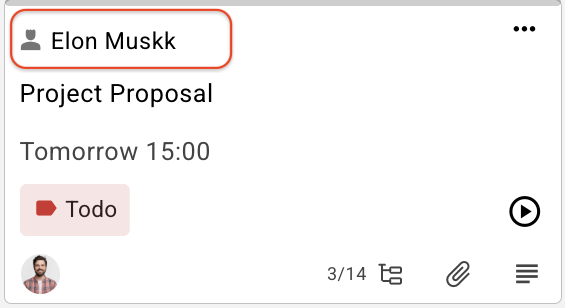
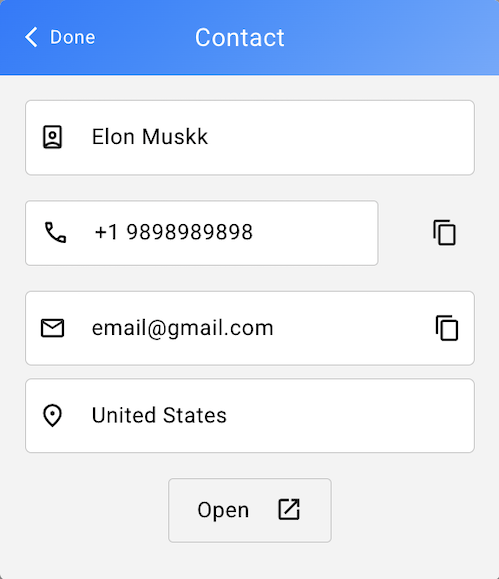
- Task card now displays the contact name passed from GoHighlevel. Clicking the contact name opens a detailed view of the contact, and from there, you can also access the GoHighlevel contact page directly.
⚡ Improvements
Small UI tweaks to make your task management even more enjoyable.
Bug fixes and performance enhancements for a better experience.
Thank you for using GoTodo! We’re always working to make your productivity better.
7.9.6
📅 Calendars
- Connect External Calendars (Pro feature): Outlook Calendar integration is now live! Following our recent Google Calendar release, you can now sync events and manage schedules from both Google and Outlook calendars.
Calendar Settings
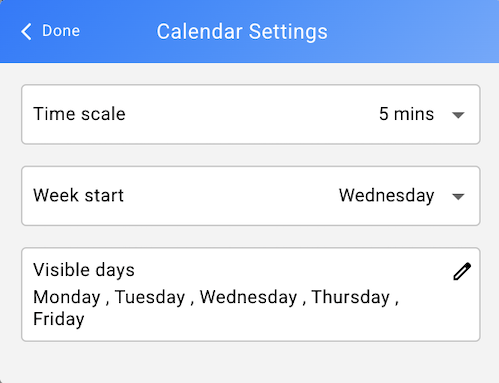
Time Scale: Choose intervals of 5, 6, 10, 15, 30, or 60 minutes.
Week Start: Set which day your week begins (e.g., Monday).
Visible Days: Choose which days to display — for example, hide Saturday, Sunday.
How to update: Go to
My Account > User Settings: Calendar Settingsor update directly in the calendar settings.
Work Hours
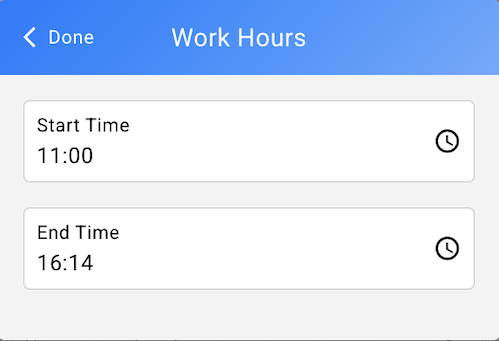
Start Time / End Time: Set your daily work hours. These will automatically define due times for your tasks.
How to update: Go to
My Account > User Settings: Work Hours.
More updates on the way. Try out these updates and let us know what you think — your feedback helps us improve and shape what’s next!
7.9.5
📅 Calendars – Release Notes
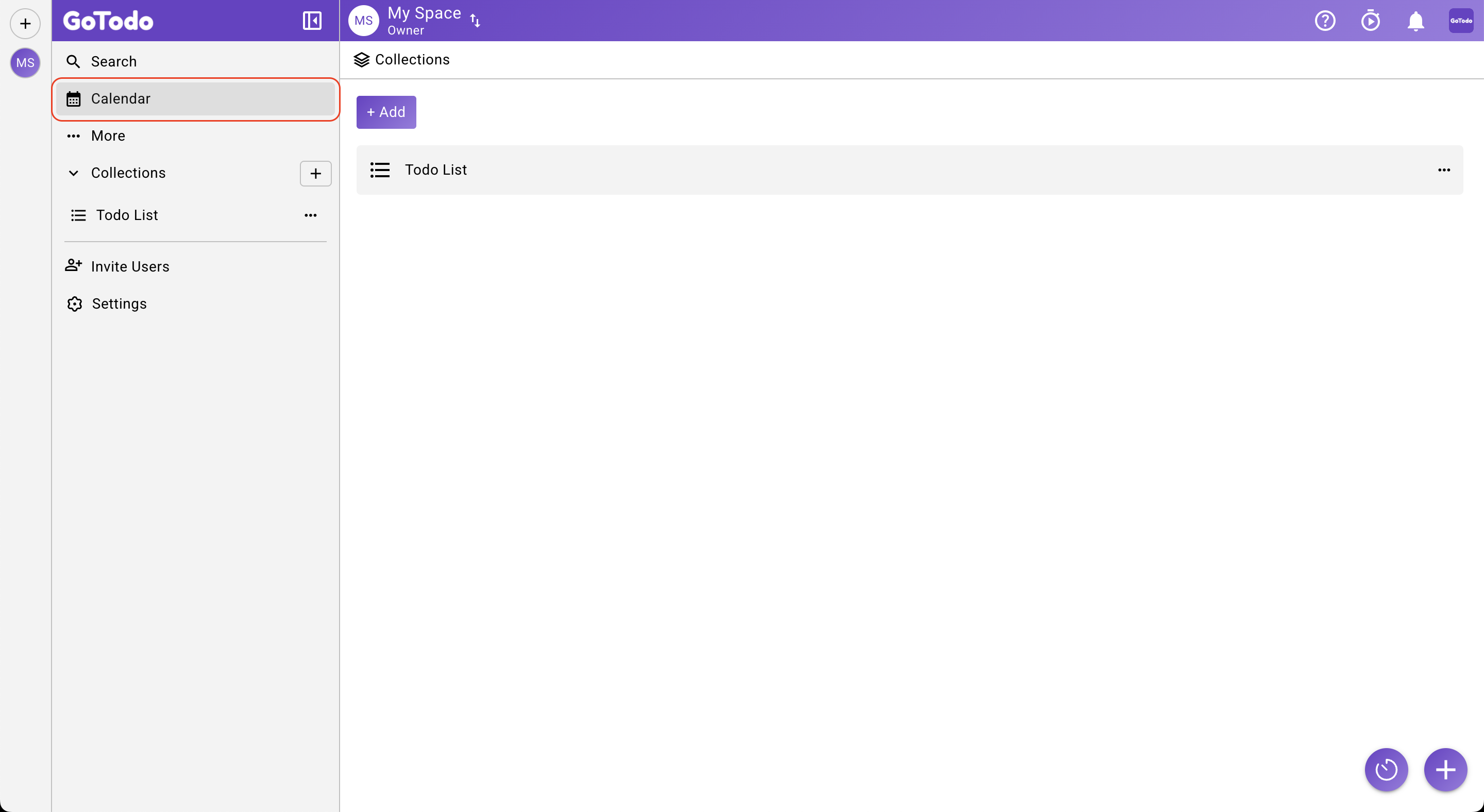
My Calendar
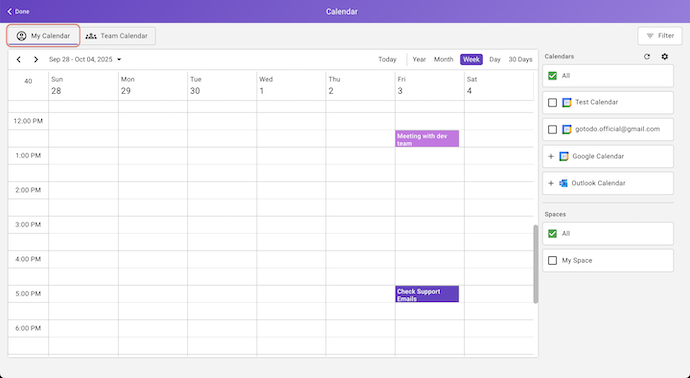
- Connect External Calendars (Pro feature): Integrate your Google Calendar (Live) or Outlook Calendar (Available later this week) with GoTodo.
- Unified View: See your calendar events alongside tasks assigned to you across all spaces.
- Flexible Filtering: Filter events by Calendar, Space, or both.
- Full Event Management: View, edit, or delete your calendar events directly from GoTodo.
- Seamless Meetings: Open and join event meeting links without leaving the app.
Team Calendar
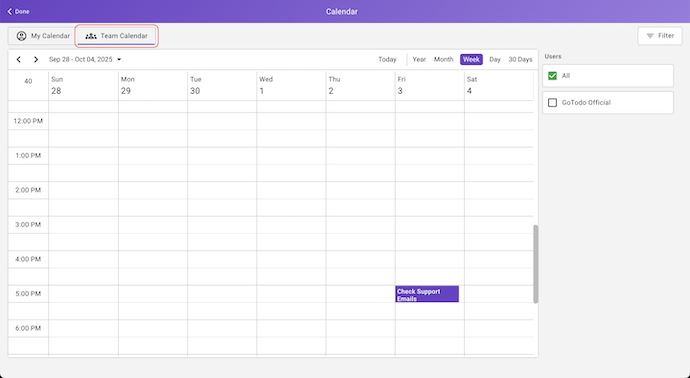
- Team Visibility: Track your teammates’ tasks across all spaces to see planned workloads and progress.
- Collaborate Efficiently: Gain insight into your team’s schedule to coordinate and manage tasks more effectively.
- Multi-User Filtering: Filter data by one or more users to focus on specific team members.
With these updates, GoTodo now gives you a complete view of your personal and team schedules, helping you plan smarter, collaborate better, and never miss an important task or event. Upgrade now to unlock full calendar integrations and make the most of your productivity!
7.9.3
✨ Clearer Task Cards
- Task priority is now shown as an icon, and Timeline cards display only the due time — giving you more space to see tasks at a glance.
📅 Enhancements
- Core improvements to support upcoming Google, Outlook Calendar integrations and more.
7.9.2
- Timeline view got a little makeover, some sneaky bugs were squashed, and Gotodo is now feeling smoother and happier—just for you!
7.9.1
🚀 Timeline View
We’re excited to introduce the Timeline View, a new way to see your tasks laid out by due date.
Why You’ll Love It
- Plan Day-by-Day: Get a clear visual of what's due each day.
- Stay Ahead of Deadlines: Easily spot upcoming and overdue tasks.
- Keep Unscheduled Tasks in Sight: A dedicated section for tasks without a due date keeps them visible and ready to be scheduled.
- Flexible Planning: It’s a great alternative to traditional status-based boards, giving you a new perspective on your work.
Key Features
- Board by Due Date – Tasks are laid out across columns representing days.
- Drag-and-Drop: Easily assign or modify a due date by dragging a task from one column to another.
- Extendable Timeline – Scroll further into the past or future by clicking expand buttons.
- Scroll to Today – "Today" button lets you jump straight to today’s column for instant focus.
- "No Due Date" Section – Tasks without a deadline live in their own board column, always shown first.
🙏 A special thank you to the user whose valuable feedback was instrumental in the creation of this feature. We hope the Timeline View helps you manage your projects more effectively. Please keep the suggestions coming!
7.9.0
🚀 Infrastructure Update
- We’ve upgraded our infrastructure to deliver ⚡ faster performance and 🌍 improved accessibility across the globe. This enhancement is part of our ongoing commitment to providing you with a seamless and reliable service.
7.8.0
- Resolved an edge case in the Gantt chart where deleting a sub-task with dependencies could cause issues. Thanks for bringing this to our attention — you rock! 🙌
7.7.9
This release focuses on a series of internal updates and performance improvements aimed at enhancing the overall user experience of GoTodo. We’ve made behind-the-scenes optimizations to ensure the platform runs smoother, and faster, so you can focus more on what matters most.
7.7.8
✨ We’ve Been Busy!
Polished UI/UX for a smoother, easier experience 🎨
Performance tweaks for extra speed ⚡
7.7.7
⚡ Improvements
Fixed the positioning of Gmail and Outlook icons on task cards.
This update includes several small fixes and general performance enhancements.
Thanks for your feedback! Keep it coming.
7.7.6
This release includes updates and improvements to support the ongoing mobile app release (version 7.7.6).
7.7.5
⚡ Improvements
Task Card Click Behavior
- In the previous version, clicking on the empty space of a task card didn’t open the Task form. This has now been fixed — clicking anywhere on the task card’s blank space will correctly open the form, so you no longer need to always use the more actions menu to edit the task.
Task Form Assigned Users
- The alignment issue with assigned users on the Task form has been resolved. When multiple users are added, their names now display correctly and align properly.
We appreciate you! Your feedback is what helps us make GoTodo better for everyone.
7.7.3
We’re constantly working to make your experience with GoTodo faster, more reliable, and more powerful. This update not only boosts performance but also makes it easier to bring your work together.
✨ What’s New
Pro Upload Power: Pro users can now attach a wider variety of file types — including video files — directly to tasks.
Bigger Files, Fewer Limits: Upload attachments up to 50 MB per file, so you can keep all the important details in one place.
⚡ Improvements
Blazing-Fast Performance: Syncing and navigation are now smoother than ever, with noticeable improvements in speed.
Increased Reliability: We’ve fixed more bugs under the hood, giving you a more stable and consistent experience.
📱 Mobile & More:
The above updates will also be live in our mobile apps for iOS and Android, as well as our desktop apps for macOS and Linux, as soon as they complete their review process.
- Loving the updates? Let us know what you think! Your feedback helps us build a better app for you.
7.7.2
✨ Improvements
Summary Dashboard – Quick Updates
Just a few days ago, we rolled out the new Summary Dashboard with all-space visibility, and we’re thrilled to see how many of you are using it. You’ve also shared great feedback on how to make it even more efficient for your workflows.
In this release, we’ve focused on performance:
- Task lists inside cards (like “Today” or “Not Started”) now use lazy loading, so items load dynamically as you scroll.
- This makes opening large lists — even thousands of tasks — much faster and smoother.
🐞 Bug Fixes
- Task Assignment Visibility – Fixed an issue where some users weren’t appearing in the “Assign To” list for certain tasks in the Summary Dashboard.
✨ We’ll continue to listen closely and roll out improvements step by step. Keep sharing your feedback — it helps us make GoTodo better for everyone!.
7.7.1
🛠 Improvements
- Folder content sorting – Folders are now always displayed at the top, with all other items shown below. This ensures a more intuitive and consistent content organization.
🙏 Thanks for your feedback and for helping make GoTodo better. Keep it coming!
7.7.0
📊 Summary Dashboard
We've made the summary dashboard a lot more useful for managing your work.
You'll now see an overview of all your spaces by default, so you don’t have to switch back and forth.
Need to narrow it down? You can easily filter by specific spaces or users.
Click on tabs like "Today" and "Not Started" to quickly view the relevant tasks.
⚡ Streamlined Workflow
We’ve made a few key changes to save you time:
- Inline editing: Edit tasks/subtasks, docs, and flows directly where they are, without leaving your current view.
- Easier collaboration: Use the More Actions menu to copy a direct link to any item and share it with your team.
🙏 Thanks for your feedback and for helping make GoTodo better. Keep it coming!
7.6.0
Gantt Chart Improvements
This update fixes display, alignment, and stability issues with task dependencies.
Version 7.6.0 is under review for iOS, Android, Mac, and Linux platforms and will be released soon.
Important: Dependency links created in version 7.6.0 will not load on older versions of GoTodo – upgrade to 7.6.0 on all platforms for compatibility.
7.5.4
Right-click spell check in browser:
We've resolved an issue that prevented the browser's native spell check from appearing when right-clicking document text. You can now use your browser's spell check functionality as expected.
A special shout-out to the user who brought this issue to our attention. Your feedback is what makes GoTodo better for everyone!
7.5.3
Translation Fixes
- Corrected several language translation errors across the app to improve clarity and localization support for non-English users.
7.5.2
✨ Updates & Improvements
Performance Enhancements – Enjoy a faster, smoother experience across the app.
UI Refinements – Cleaner interface for better usability and readability.
Stability Improvements – Fewer crashes and smoother interactions.
Behind-the-Scenes Optimizations – Laying the groundwork for future features.
Thank you for being a part of the GoTodo community!
7.5.1
We're excited to announce that GoTodo now supports two new languages: Arabic (عربي) and Ukrainian (Українська)!
A special shout-out to one of our users for requesting Arabic support—your feedback helps us make GoTodo better for everyone.
To switch your language, just go to My Account > User Settings > Language and select your preferred locale from the dropdown menu.
Thank you for being part of the GoTodo community! We hope you enjoy the new language options.
7.5.0
🚀 What's New: A More Powerful and Personalized Experience
We've been hard at work making GoTodo even better! This update brings some powerful new features and a cleaner, more intuitive design to help you and your team get more done.
✨ App Settings
- Now you can truly make GoTodo your own. Go to Settings > App Settings to enable or disable any module or task field. Only see what you need and remove the rest.
⚡️ Dedicated Sprints
Say goodbye to using custom fields for sprint management. We've introduced a dedicated Sprints module to streamline your agile workflow. Easily create, manage, and track your sprints all in one place.
Sprint overview includes Sprint Burnup, Burndown, and Velocity charts to give you a clear picture of your progress.
💪 Task Points
In addition to time estimates, you can now use Points to measure the workload of a task. This gives your team more flexibility in estimating and tracking progress.
You can even set user-specific points for each task or subtask — enabling granular planning across team members.
📊 Improved Overviews
- We've completely redesigned the widgets for the Space Summary, List, and Sprint Overviews. They now provide a much better overview of your tasks and subtasks, making it easier to see what's happening at a glance.
🎨 UI/UX Enhancements
- We've made numerous UI/UX improvements throughout the app to create a smoother and more enjoyable experience. You'll notice a cleaner layout and more intuitive interactions in your day-to-day work.
📱 💻 The above updates will be live in our mobile apps for iOS and Android, as well as our desktop apps for macOS and Linux, as soon as they complete their review process.
We hope you enjoy these new features! As always, your feedback is invaluable. Please let us know what you think.
7.4.0
Timesheets & Time Estimates
We're thrilled to roll out one of our most requested features — Timesheets! — along with the powerful new Time Estimates capability!
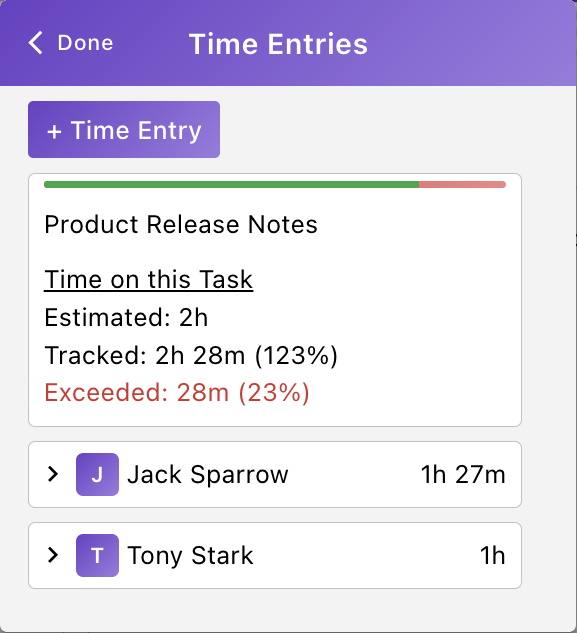
With these additions, you can now track every minute you spend on tasks, plan better with time estimates, gain insights into your productivity, and manage your time like a pro.
⏰ Effortless Time Tracking
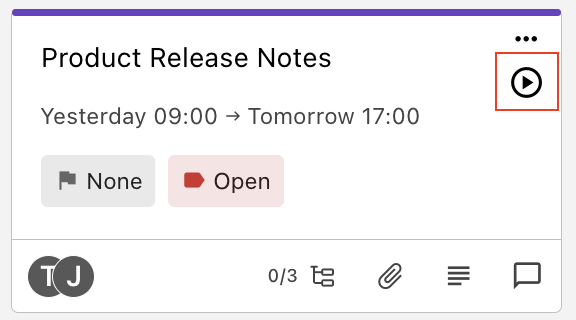
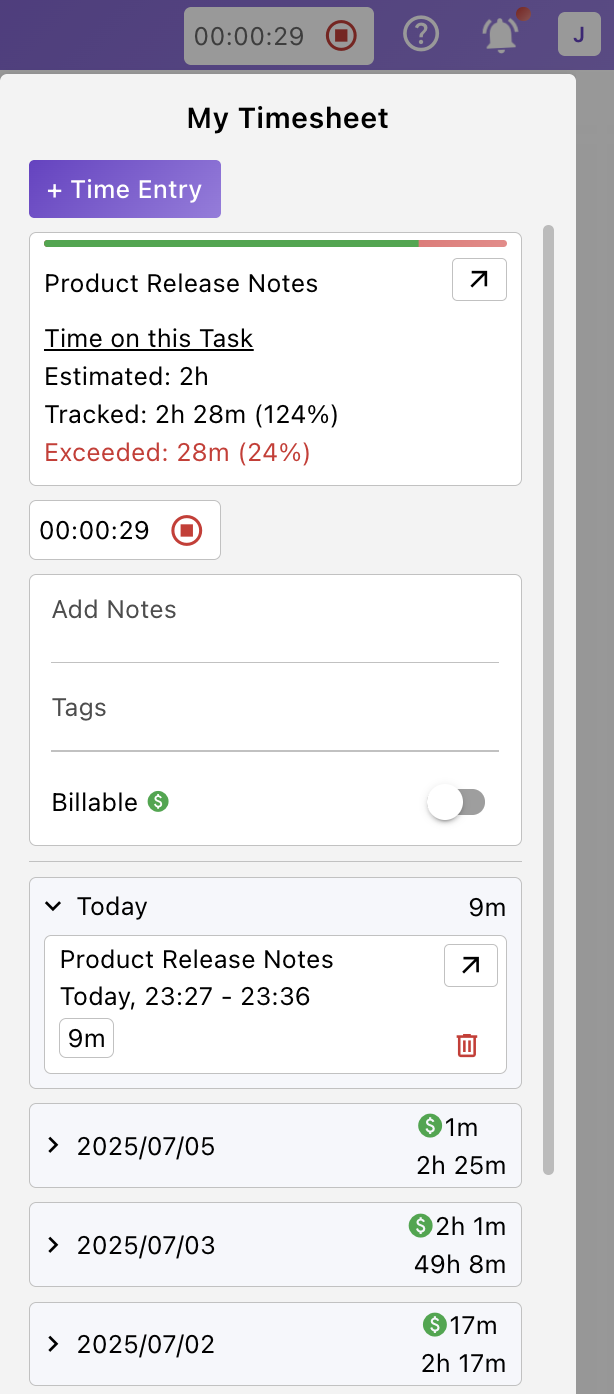
- Start or stop timers directly on any task, or log time manually when needed — perfect for any workflow.
💼 Billable vs. Non-Billable Hours
- Easily mark time entries as billable or non-billable to keep your client work and internal time clearly separated.
📝 Smart Time Entries
- Attach quick notes to each entry so you’ll always remember what you were working on — even weeks later.
📊 Productivity Insights
- View total time spent on tasks, and get daily breakdowns of your hours to help you stay on track.
⏳ Time Estimate
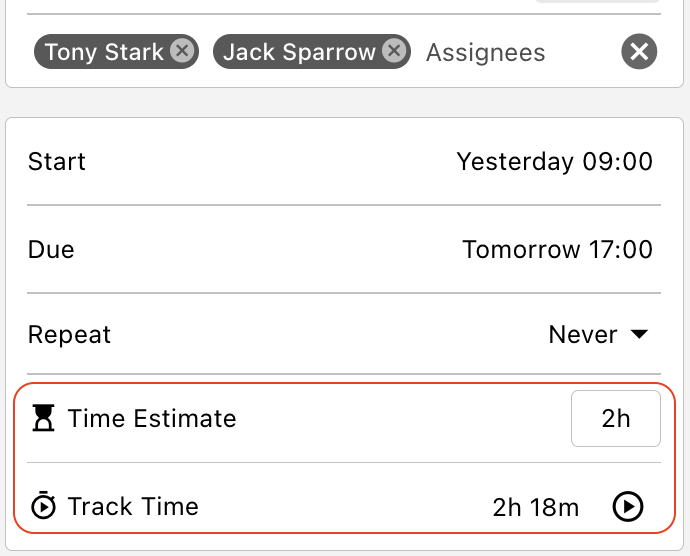
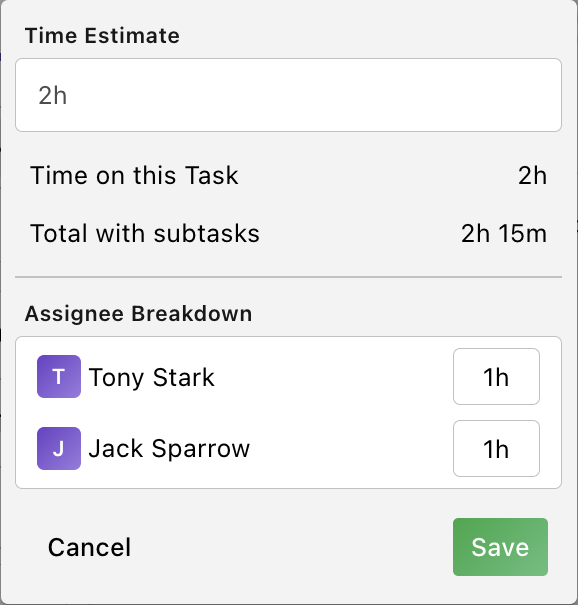
- Add estimated time to tasks or subtasks to plan ahead and allocate resources wisely.
- You can even set user-specific estimated time for each task or subtask — enabling granular planning across team members.
Enjoy a smoother, faster, and more intuitive experience with our refreshed interface and improved responsiveness across GoTodo.
Thanks for using GoTodo — we hope these updates make collaboration and tracking even easier!
7.3.2
- This release includes performance fixes in GoTodo Flow, resolving lag issues on tablets and iPads reported in the last version. We’ve also upgraded the database and optimized the backend for a faster, smoother experience.
7.3.1
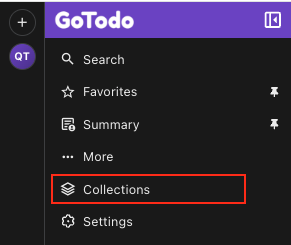
Projects are now “Collections”:
- To better align with upcoming features, we've renamed Projects to Collections. This change sets the stage for future updates that will allow you to upload and organize any type of file within any folder, making your Gotodo workspace even more flexible and powerful.
- We've made several UI/UX updates to enhance your experience. Thanks for all your feedback — it helps us keep improving!
7.3.0
Just like Doc & Flow, You Can Now Share Your Progress with Anyone!
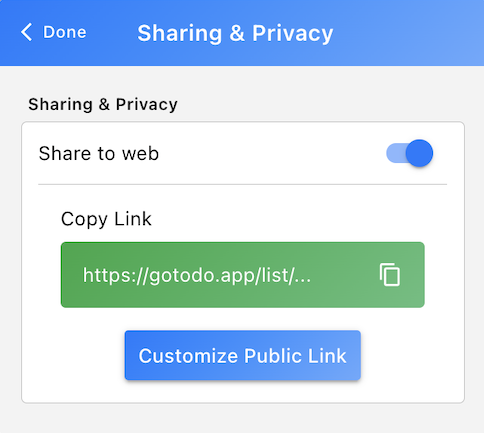
- You can now generate a read-only public URL for any of your GoTodo views – whether it's a Checklist, Board, Table, Calendar, or Gantt chart. This is perfect for sharing specific project progress perspectives with clients, external team members, stakeholders or friends and family. They don't need a GoTodo account to see your progress – just the link! It's the perfect way to provide transparent updates and ensure everyone is aligned.
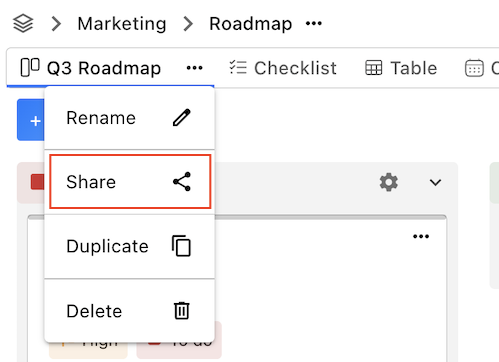
How it works:
- Simply generate the public URL for your desired list view, and anyone with the link can view it! This feature provides a seamless way to keep stakeholders informed and engaged with your project's progress.
UI/UX Enhancements:
- We've significantly improved the user interface and overall user experience across GoTodo. Expect smoother interactions, better responsiveness, and a more intuitive design as you navigate through the application.
We hope these new features help you collaborate and share your progress more effectively. As always, thank you for using GoTodo!
7.2.0
Updates & Improvements
On small-screen views, you can rearrange, show, or hide individual footer navigation items as before. In addition, you can now hide the entire footer navigation by disabling all items.
Based on your feedback, "My Account" and "Notifications" have been moved from the footer to the header - in small-screen views (Outlook, VS Code, browser extensions).
We’ve also quietly squashed a few bugs—they won’t be bothering anyone anymore.
7.1.1
Fixes & Improvements
Display & Layout Fixes: Resolved resizing issues on small screens and addressed layout inconsistencies on some pages, including when accessed via the Outlook extension.
UI/UX Enhancements: Improved the user interface and experience across GoTodo to ensure smoother interactions and better responsiveness.
7.1.0
⚡️ Smarter Timezones: Work Better, Together!
- We've supercharged our timezone features to make collaboration smoother and clearer for teams everywhere.
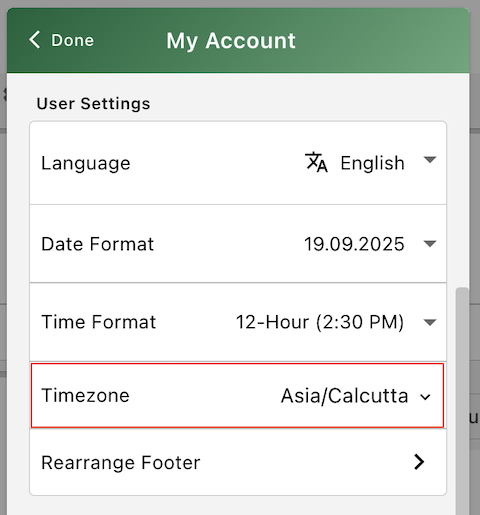
👤 Set Your Own Timezone:
- You can now set your preferred timezone directly in My Account > User Settings. This setting controls how all times appear to you in the app, regardless of where you are or what device you're using—just ensures a consistent view of tasks, reminders, and activity logs wherever you go.
🌐 Space Timezone for Crucial Context:
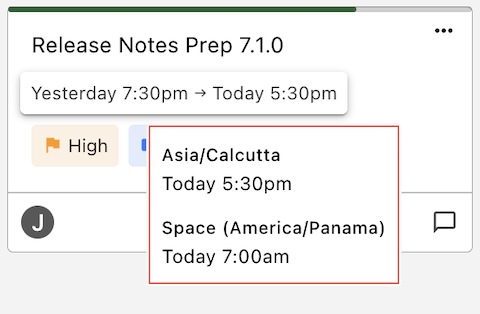
- Each Space now has a designated timezone, set in Space settings. When you hover over any task deadline or event timestamp, you’ll see a tooltip showing the equivalent time in the Space’s timezone. This provides helpful context—especially for teams working around a central location—without affecting how times are stored or displayed to others.
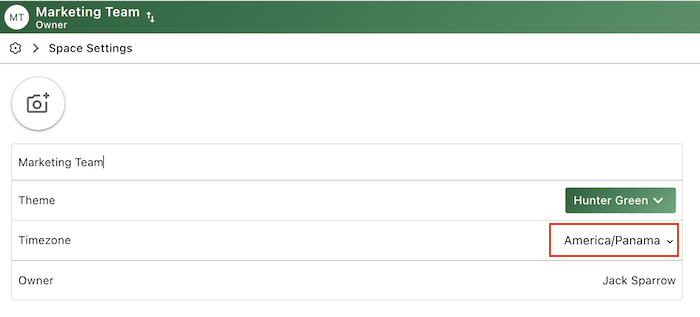
- Example: A task shows "Due: 5:30pm (Your Time)". Hover over it, and you'll see "7:00am Space Timezone (America/Panama)".
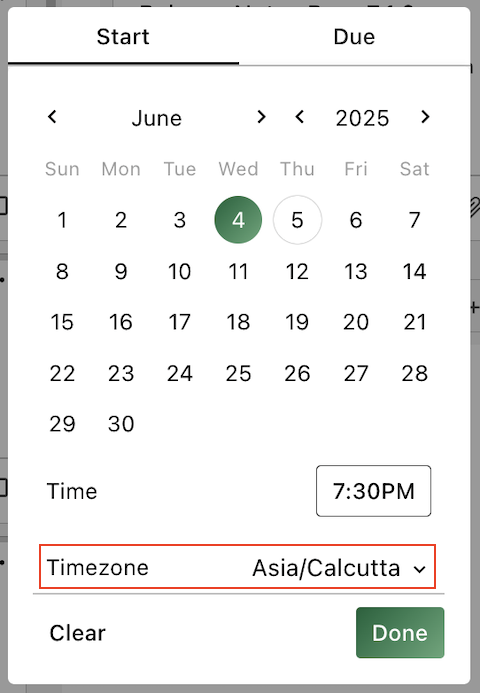
⏰ Schedule Tasks in Any Timezone:
- Gone are the days of mental math! You can now set a task's due or start time in any timezone! When viewed, it automatically adjusts to the viewer's local time. This feature is perfect for global collaboration, allowing you to easily schedule tasks for someone else's local time.
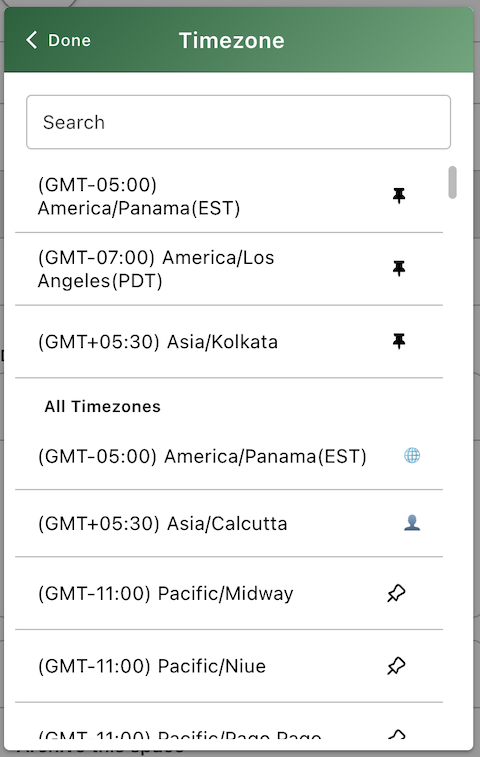
📌 Pin Your Favorite Timezones
- Make scheduling faster by pinning your frequently used timezones. Your go-to zones—like your team’s main operating time or a key client’s timezone—will stay at the top of the list when setting task times, so you never have to search for them again.
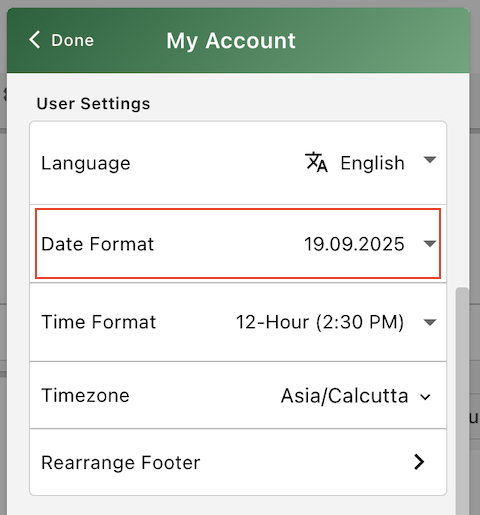
🗓️ Date Formats
- You can now choose how dates appear throughout the app by selecting your preferred format in My Account > User Settings. Whether it’s MM/DD/YYYY, DD/MM/YYYY, or another common style, your tasks, events, and due dates will display exactly the way you want.
"We’re excited to bring these enhancements to your workflow, making teamwork across timezones simpler and more reliable. Your insights help shape GoTodo, so please keep the feedback coming. Together, we’re building a smarter, more connected project management experience. Stay tuned for what’s next!"
7.0.0
✅ Task Activity Log
Track everything happening in your tasks with a detailed Activity Log:
Logs updates to all task fields, comments, and attachments
Upcoming: support for logging task dependencies and goals/milestones
🔔 In-App Task Notifications
Stay informed with real-time notifications for tasks created by you or assigned to you, including updates to fields, comments, and attachments.
Filter Options:
Unread
Saved
All
Quick Actions:
Open Task
View Comment
Mark as Read
Add to saved / Remove from saved
🛠️ Fixes & Improvements
Fixed version history not displaying in some browsers for both Docs and Flow — now renders consistently across all supported environments
Squashed various minor bugs to improve stability and overall performance
"Your feedback drives GoTodo’s progress, and we’re committed to continuous improvement and exciting new features ahead. Thank you for helping us grow — more improvements are on the way!"
6.4.6
[Fix]
- Deleted users are no longer shown in the "Assigned Users" dropdown.
6.4.5
Archive
You can now archive any completed or inactive items — including spaces, folders, lists, tasks, docs, flows, and journals.
To restore archived items:
- Go to Space Settings to unarchive a space.
- For all other items, navigate to Settings > Archive.
6.4.2
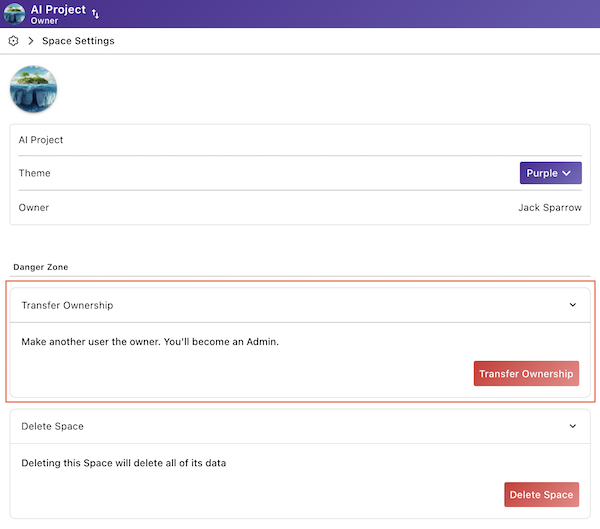
Transfer Space Ownership
- We’re excited to announce a feature that many of you have requested — the ability to transfer ownership of a space to another user. We’ve made this update based on your feedback to give you more control and flexibility in managing your spaces.
6.4.1
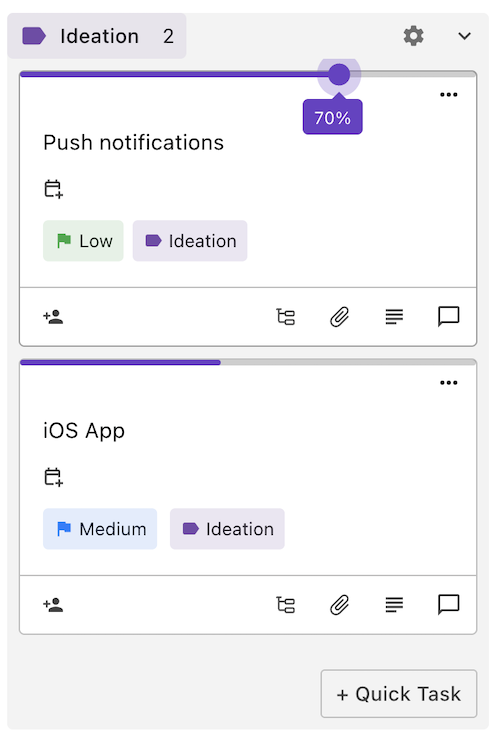
Task Progress
Track and Update Task Progress: You can now track and update the progress of tasks directly from within the task card or by editing the task. This feature provides an intuitive way to see how close a task is to completion, and makes updating your progress quick and easy.
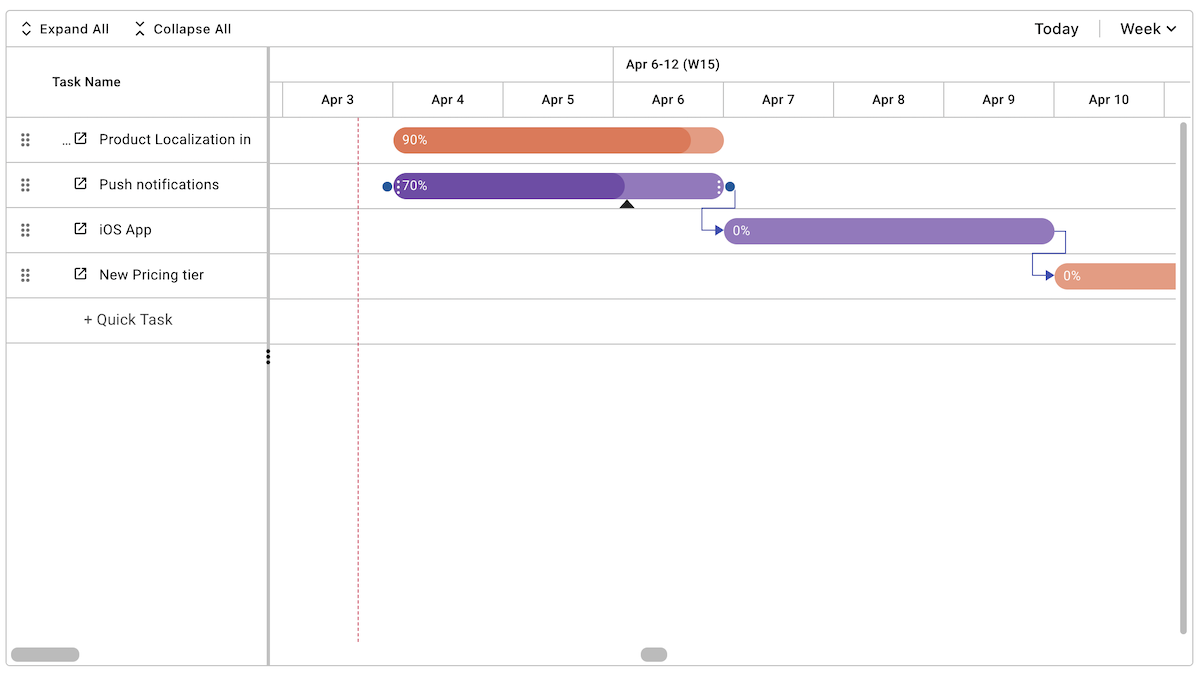
Gantt Chart Updates
Link Tasks: You can now link tasks to each other within the Gantt chart, helping you visualize task dependencies and relationships better.
Update Task Progress from Gantt: In addition to the task card, you can now update task progress directly from the Gantt chart, keeping your timelines and project status up-to-date in real-time.
6.4.0
Project Folders
Create dedicated project folders to house all related lists, documents, flows, and goals.
Centralize your project resources for improved accessibility and collaboration.
Enjoy a cleaner, more organized workspace.
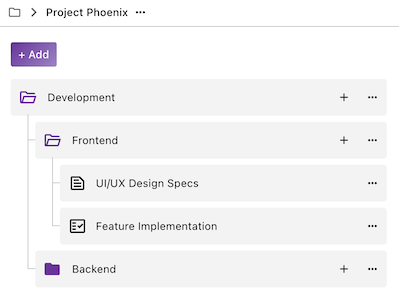
Subfolders
Build a hierarchical structure within your projects using subfolders.
Categorize and organize project elements with greater precision.
Simplify navigation and make it easier to locate specific items.
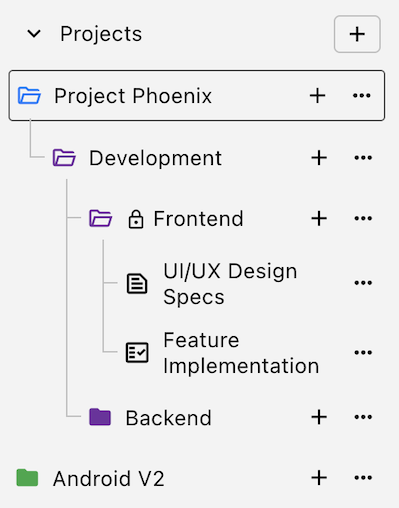
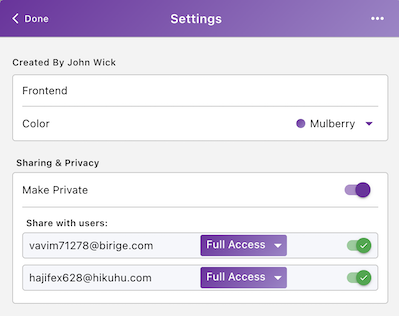
Private Folders
Maintain confidentiality with private folders, restricting access to sensitive information.
Share private folders selectively with authorized users.
Ensure data security and control who can view and modify specific project components.
6.3.0
Goals & Nested Milestones
Goals
Create actionable goals to keep your tasks and projects aligned and on track! Assign specific tasks or projects to these goals to keep everything aligned and focused on the bigger picture.
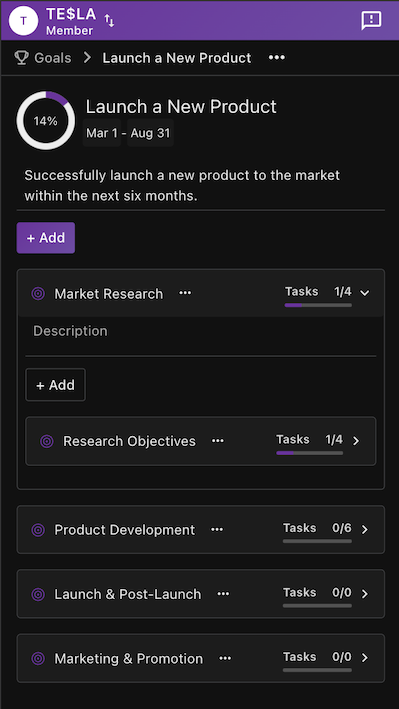
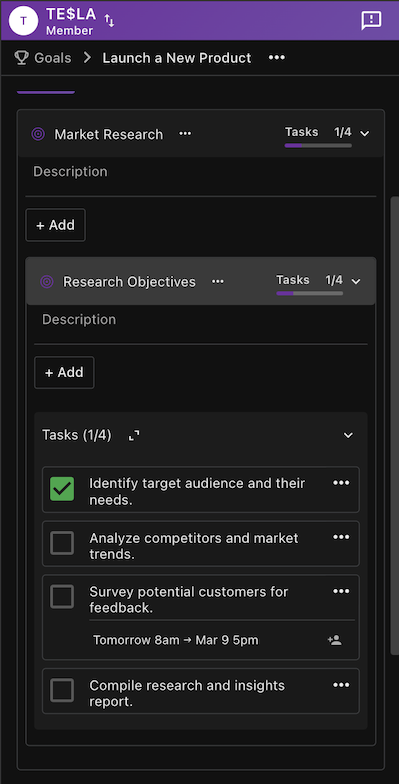
Nested Milestones
Break down your goals into smaller, manageable milestones. Each milestone can have its own set of tasks or projects, making large projects more organized and easier to track. This nested approach helps you tackle complex objectives step by step.
6.2.2
- A special thanks to Naveen for your valuable feedback! We’ve enhanced the Gantt chart by saving the splitter position. Now, the position will persist on your device, so you no longer need to drag the splitter each time you open your chart.
6.2.1
- We've squashed a few bugs and fine-tuned the design to deliver a smoother, more intuitive experience, boosting app stability and performance.
6.2.0
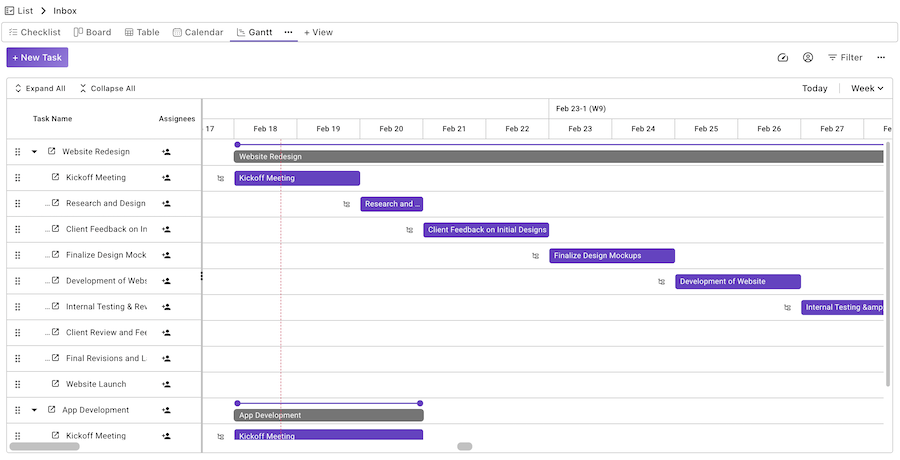
Gantt Chart View
We are excited to announce the beta release of the Gantt Chart View (Pro) for GoTodo! Now you can visualize project timelines and tasks, enhancing project management capabilities. We welcome your feedback!
6.1.0
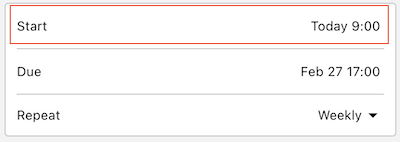
Task Scheduling Enhanced
- Tasks now have a start date and time, allowing for more precise deadline management.
Calendar Improvements
- The calendar view is now easier to use and provides better planning with enhanced Month and Year views.
Table View Fix
- An issue causing overlapping "more actions" in the table view on certain devices has been resolved.
6.0.3
Improved Table View
- The default "Group" setting is now set to "None," providing a cleaner and more straightforward table layout for your tasks.
- We've optimized the Table View for improved performance and usability, making it faster and easier to use with several behind-the-scenes updates.
6.0.2
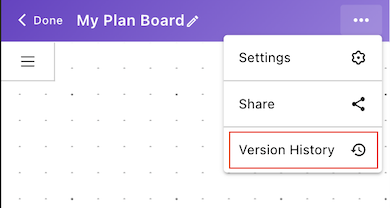
Version History
- You can now easily access past versions of your documents and flows, and revert to a previous state when necessary. This feature is designed to help you stay organized and ensure you can always recover important content or changes. Free plan is limited to the latest 3 versions.
6.0.1
Unlimited Guests in All Plans
- No more limits on guest users! You can now invite as many guests as you need across all plans! Guests will have view-only access, allowing them to easily follow along without affecting your workspace. Collaboration just got more flexible.
Introducing the Squad Plan
- The Squad Plan is here! Perfect for smaller, agile teams who need flexibility and productivity.
More Local Currencies
- We've added support for more local currencies, giving you the convenience of paying in your preferred currency.
Improved Language Support
- GoTodo now offers even better language support, including improved translations and a more localized experience for all users, no matter where they are in the world.
6.0.0
Custom Views:

- Create personalized views in your lists with preferred layouts: Checklist, Board, Calendar, or Table.
- Rearrange views as per your choice, with the first view being the default for the list.
- Advanced filtering, sorting, and grouping options allow for precise task organization tailored to your specific needs.
Import/Export Tasks:
Import from Excel: Easily import tasks from Excel, simplifying the transition from other platforms.
- Export to Excel: Effortlessly export tasks to Excel for easy data sharing and reporting.
GoTodo Gets a Polish!
- We've recently made some under-the-hood improvements to GoTodo, including UI refinements for a smoother user experience. Explore the app and enjoy some delightful surprises – we're always striving to enhance your productivity journey.
5.7.6
- Enhanced Task Cards: Added comments count and sub-task count directly on task cards for easier tracking.
5.7.5
- Bug Fix: Resolved an issue where closing the task quick create dialog in mobile incorrectly redirected users to the inbox.
5.7.4
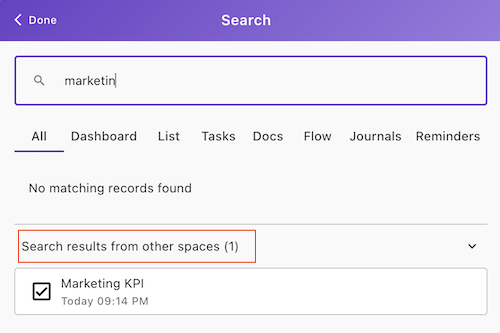
Search Across All Spaces:
Now, results from other spaces are also displayed at the bottom of the search results, making it easier to search across your entire workspace.
5.7.3
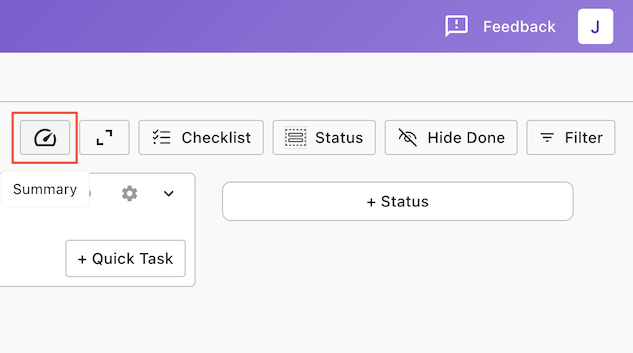
Quick Summary in List
Now you can get an instant summary of the current task list, helping you stay on top of your work without navigating away from the list. This feature provides a quick overview of key details, allowing you to efficiently track progress and manage your tasks with ease.
5.7.2
Enjoy a Personalized Footer Navigation Experience!
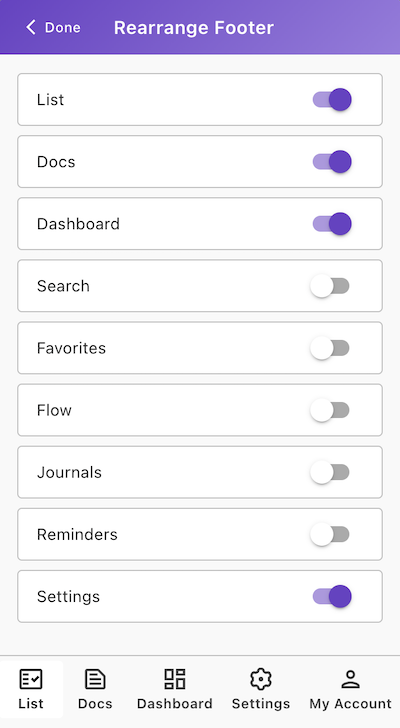
- Show, hide, and rearrange footer navigation items to suit your preferences.
- Your personalized footer settings are saved exclusively for your account and automatically applied across all the devices you use.
- NOTE: Requires update to GoTodo version 5.7.2
My Account > Rearrange Footer
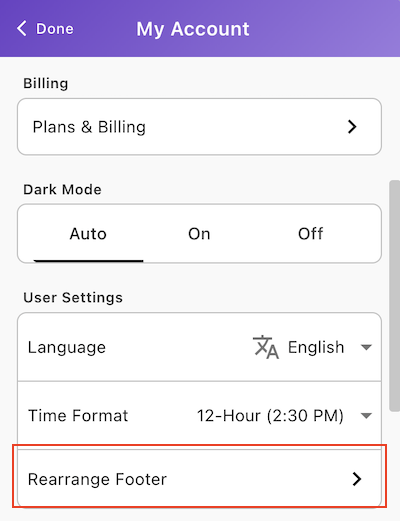
Enable/Disable and Rearrange in the order of your choice.
5.7.1
We've been busy behind the scenes polishing up GoTodo to make your experience even better. This update includes a handful of UI tweaks and improvements designed to make your to-do conquering smoother than ever before.
Expect a few pleasant surprises as you navigate GoTodo – it's all part of our ongoing mission to make your productivity journey as enjoyable as possible.
5.7.0
UI Enhancements: Improved the overall user interface to make GoTodo even more intuitive and user-friendly. These enhancements are designed to improve user experience and streamline navigation across the platform.
Dedicated Pages: Added dedicated pages for easier navigation.
Bug Fixes & Performance: Squashed bugs and optimized sync for faster, more reliable performance.
5.6.8
Custom Dashboards
We’re thrilled to unveil Custom Dashboards, allowing you to completely personalize your task management workspace! This feature lets you organize and manage your tasks through dashboards designed to fit your unique needs, boosting both visibility and productivity.
Add Widgets:
Choose from a wide variety of widgets to display key task information: 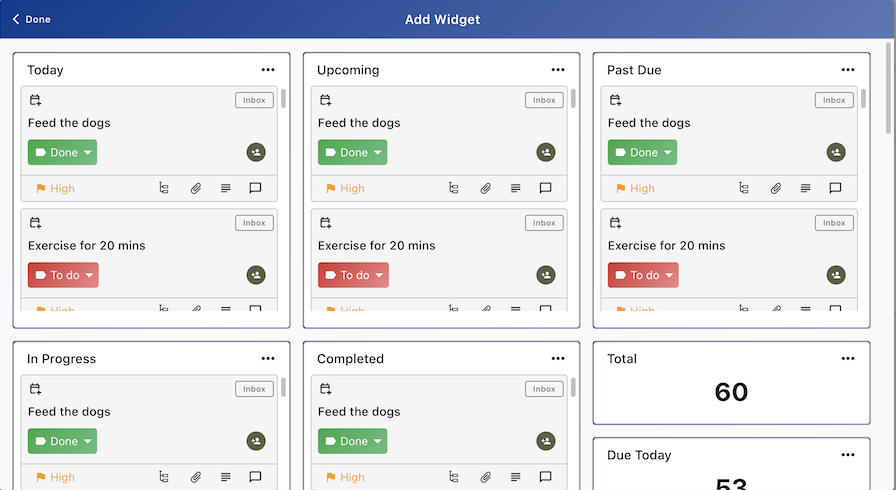
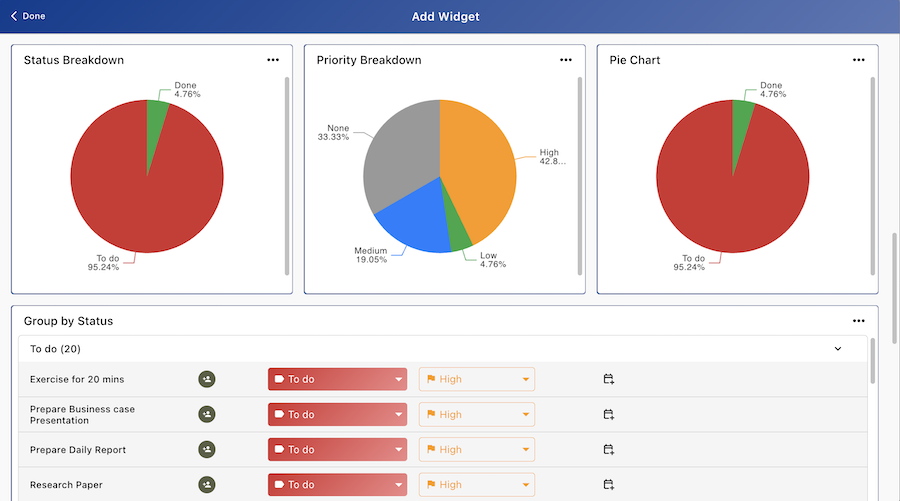
Widget Configuration
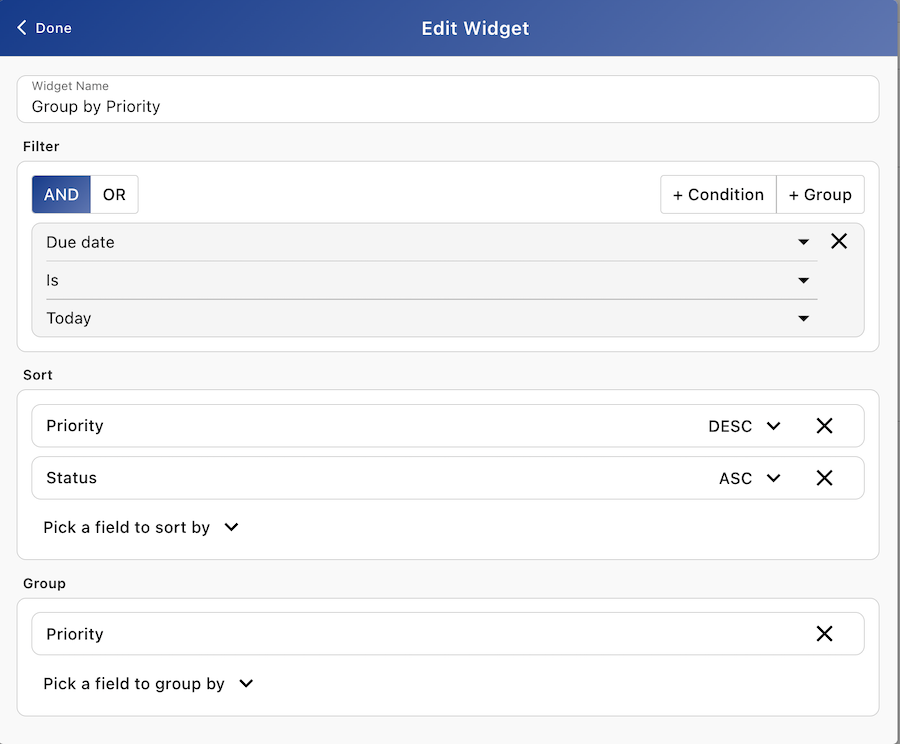
- Powerful Filtering: Use simple filters or create complex combinations using AND/OR logic across List, Due Date, Status, Priority, and more.
- Flexible Sorting: Arrange your tasks in the order that makes the most sense to you with multiple sorting options.
- Grouping: Group tasks by Status, Priority for a clearer overview.
Drag-and-Drop Layout:
Easily drag, reposition or resize widgets to customize your workspace for optimal efficiency. Arrange them to highlight your most important tasks and streamline your workflow.
Private Dashboards:
After creating your dashboard, you can make it private to keep it for your own use or share it with your team to collaborate more efficiently.
5.6.0
Custom Fields for Tasks:
Capture more details to your tasks with custom fields (Pro).
Task Summary Dashboard:
The New Task Summary Dashboard gives you an overview of your tasks.
Custom Dashboards (Coming Soon):
Create personalized dashboards to track what matters most.
Integrations:
LeadConnector Integration
GoHighlevel Integration
5.4.2
Task Repeat Options:
Every 3 Months, Every 6 Months
5.4.1
Generate Invite Code (Invite Link) for Space for a Particular User Role:
You can now generate a unique invite code (invite link) for a specific space, tied to a particular user role. This allows for more granular control over user access and permissions within the space.
How it works:
When generating an invite, you can specify the user role (e.g., Admin, Member, Guest, Custom).
The invite code will be linked to the selected role, ensuring the new user receives appropriate permissions when they join the space.
Join Space Using Invite Code (Invite Link):
Users can now join a space directly by clicking on an invite link (or entering an invite code). This simplifies the process for users to gain access to spaces without needing additional administrative steps.
How it works:
After receiving the invite code or link, the user can use it to join the space and will automatically be assigned the specified role.
5.4.0
Private Lists, Docs, Flow:
Pro users can create and manage private content, sharing with specific users and offering full or restricted access.
User Roles and Permissions:
Pro users can customize Admin, Guest, and Member roles, plus create custom user roles.
5.3.0
Gmail & Outlook Integrations:
You can now instantly convert emails into tasks, and organize them into dedicated GoTodo spaces..
Favorites:
Save Todo lists, Docs and Flows as favorites for easy access, with the ability to drag and rearrange them.
5.2.0
This release focuses on a series of internal updates and performance improvements aimed at enhancing the overall user experience of GoTodo. We’ve made behind-the-scenes optimizations to ensure the platform runs smoother, faster, and with fewer bugs, so you can focus more on what matters most.
5.1.0
Support for 20+ Languages:
We’re thrilled to introduce support for more than 20 languages, making GoTodo even more accessible to users worldwide. You can now engage with the platform in your language of choice.
5.0.0
New Customizable Templates:
Create custom templates with specific categories, statuses, and priorities to perfectly match your workflow. Need a template for work, home, or a project? We've got you covered with 15+ pre-made templates to jumpstart. Craft custom templates in Settings > Manage Templates.
Get Organized Your Way:
Now you can customize each of your task lists with unique templates. Simply edit your lists and choose a template that perfectly fits your current project or goal.
Hiding completed tasks and grouping tasks by category, statuses, or priority are now supported in your mobile apps.